
How to Use Color Picker & Swatches Field
September 13, 2026
Formpify Academy
Color Picker Field
Let shoppers choose finishes and colorways from visual swatches.
The Color Picker & Swatches field allows customers to select finishes, fabric colors, or materials through elegant, tactile visual swatches. Featuring mathematically centered active checkmarks, customizable geometries, and dynamic colorway typography, this field delivers a showroom-quality experience on any Shopify store.
Adding and Setting Up Color Swatches
- In the Formpify Builder, drag the Color Picker element from the Elements panel into your canvas.
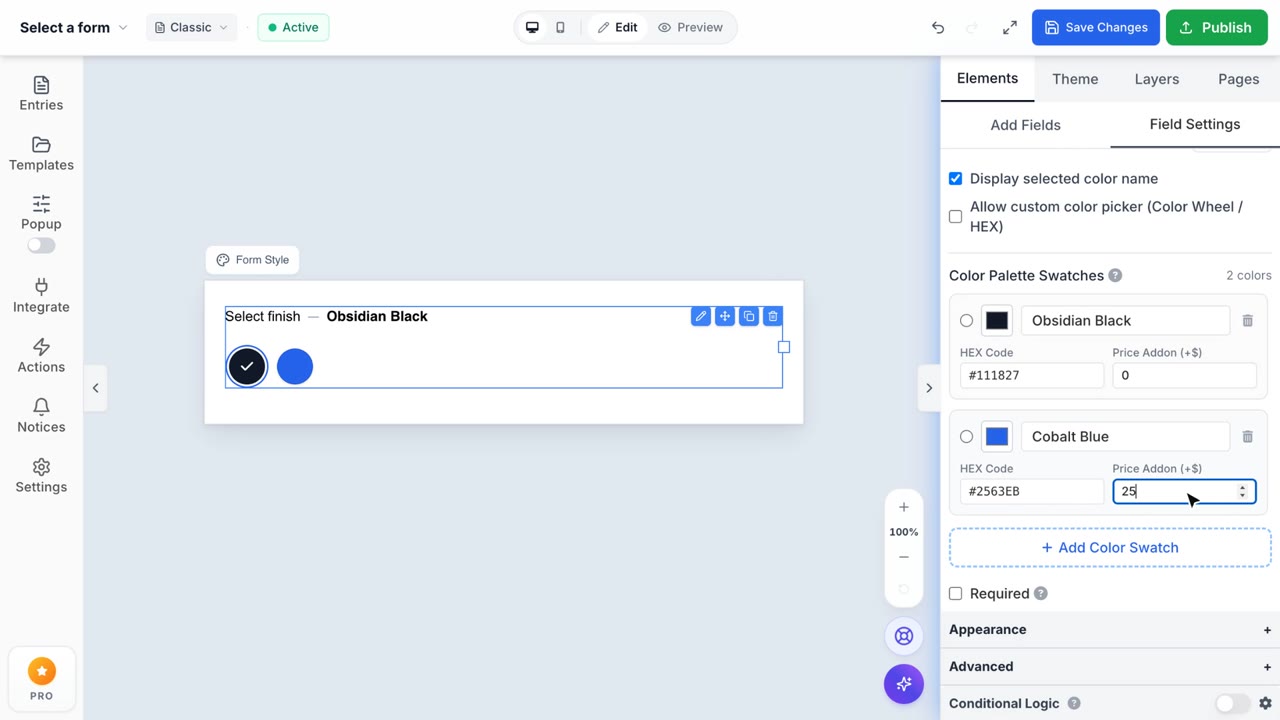
- In the right-hand settings panel, configure your color options. Click Add Color to add new swatches.
- For each swatch:
- Color Code: Enter any valid 6-character HEX code (e.g.,
#111827) or click the visual color wheel to select. - Color Name: Enter a customer-facing name (e.g., "Obsidian Black", "Cobalt Blue").
- Price (Optional): Set an addon surcharge (e.g.
+$25.00) that feeds live into the form total.
- Color Code: Enter any valid 6-character HEX code (e.g.,
Styling & Geometry Controls
- Shape: Choose between classic Circle or modern Rounded Square swatches.
- Size Presets & Custom Slider: Choose from Small (24px), Medium (32px), Large (40px), or use the custom slider to set any size between 16px and 80px.
- Show Color Name: Enable this toggle to dynamically render the active color name in natural typographic flow alongside the field label (e.g.,
Select Finish — Obsidian Black). - Light Color Isolation: White or pale swatches automatically include a subtle border outline so they remain distinct against pure white backgrounds.
Order & Cart Integration
When combined with the Add to Shopify Cart submit action, the chosen colorway name (and its associated addon price) automatically attaches to the cart item as a Line Item Property, ensuring clear fulfillment instructions.