
How to Use the Drag and Drop Editor
Drag and Drop Editor
Build powerful forms seamlessly with the intuitive visual editor.
Formpify’s reactive visual editor empowers you to craft beautiful, high-converting forms directly on the canvas without touching a single line of code. Let's break down the core mechanics of the builder.
1. Drag & Drop to Add Fields
Browse the right-hand library for your required field (e.g., Single Line Text, Dropdown), then click, hold, and drag it into the central canvas. A blue visual drop indicator will precisely guide your placement. Release your mouse to instantly render the element into the layout.
2. Seamless Reordering
Need to restructure your form's flow? You can click and drag any existing field currently sitting on the canvas to move it up or down. The intelligent layout engine will smoothly transition and snap the surrounding fields into their new positions, ensuring your grid never breaks.
3. Inline Text & Style Editor
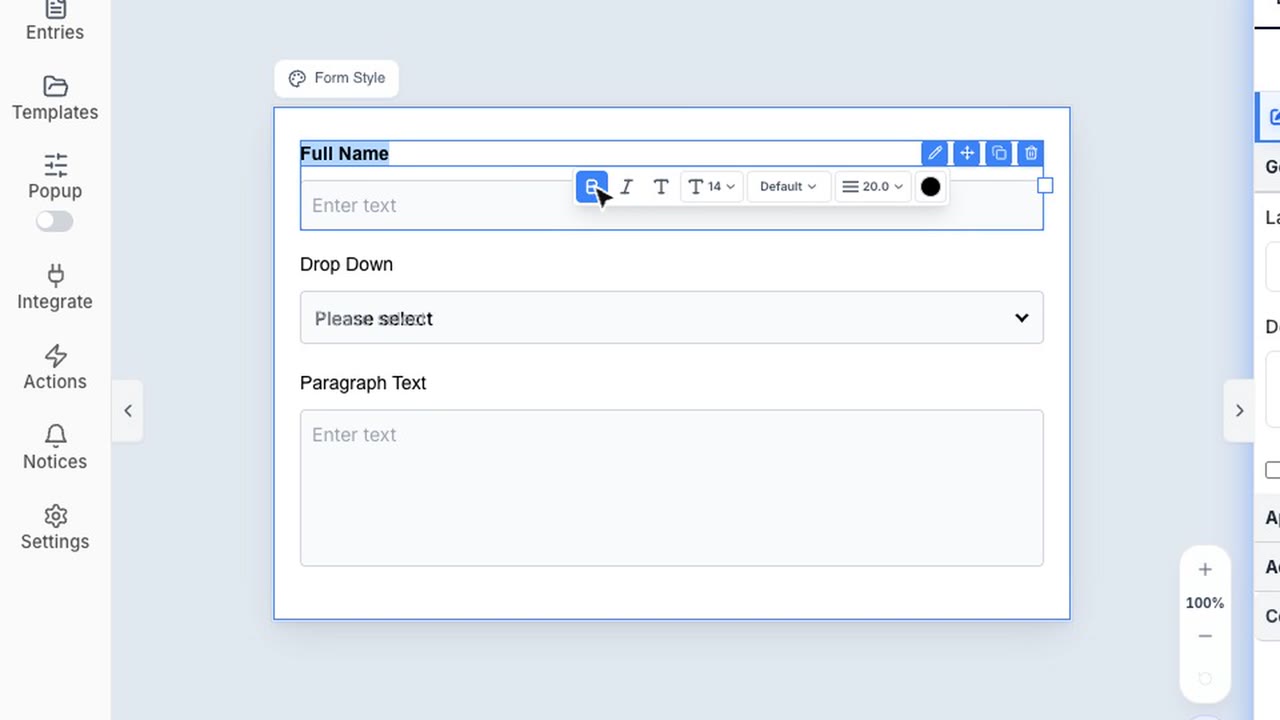
Unlike traditional clunky form builders, there is no need to switch back and forth between a preview and a complicated settings sidebar. Click directly on any field label on the canvas to edit its text inline. A context-aware floating toolbar will immediately appear above the element, allowing you to instantly apply bold/italic formatting, adjust font sizes, or change colors on the fly.