
Shopify Form Builder with Inline WYSIWYG Editor: The Complete Live Visual Customization Guide
Tired of tweaking Shopify forms through endless nested sidebar menus? Discover Formpify's live inline WYSIWYG editor—click, type, and style text, colors, and spacing directly on canvas.
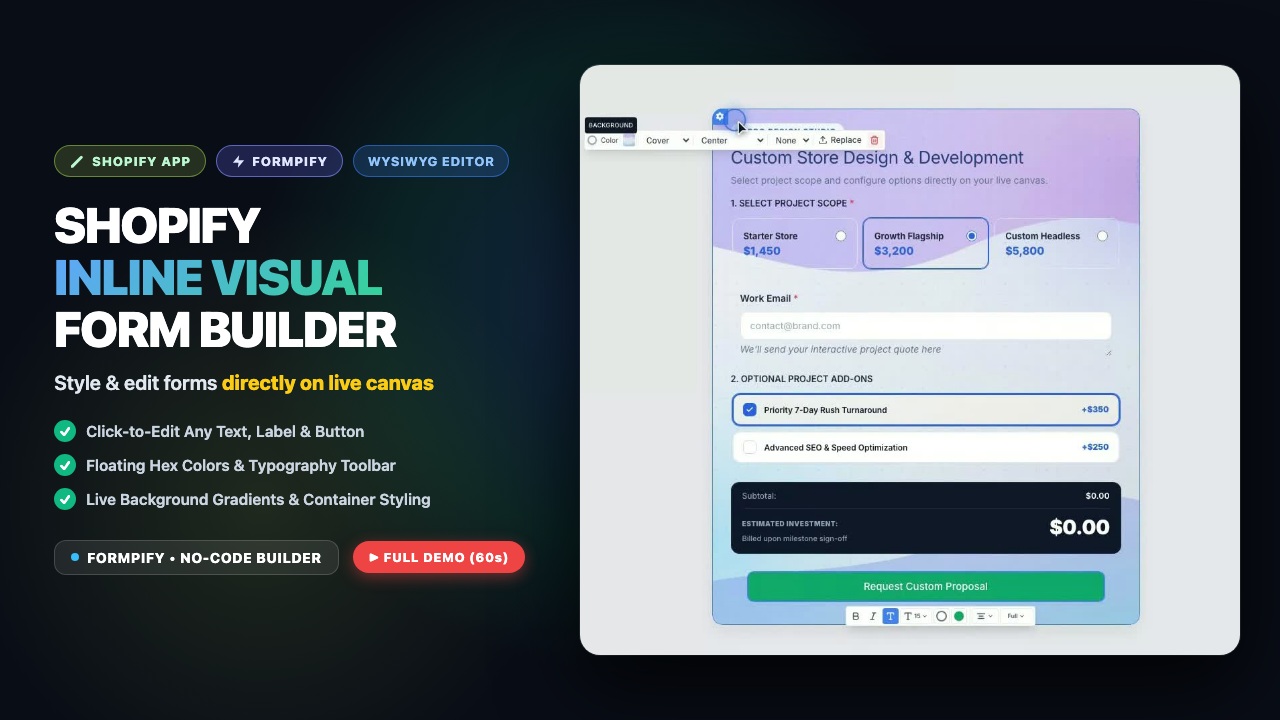
- Legacy Shopify form apps force merchants to configure text labels and styles inside complex sidebar panels, causing endless preview lag.
- Formpify brings a true WYSIWYG inline canvas: click directly on labels, placeholders, or buttons and type naturally like a word processor.
- Floating inline formatting toolbar provides immediate access to font weights, color pickers, text alignment, and dynamic placeholder tokens.
- Includes a full-featured video demonstration showing live text edits, typography updates, and spacing adjustments in under 60 seconds.
- Zero impact on Shopify Core Web Vitals: Formpify renders as an Online Store 2.0 Theme App Block with sub-50ms lightweight script execution.
Table of Contents
- →1. Why Traditional Sidebar Form Builders Frustrate Shopify Merchants
- →2. What is True Inline WYSIWYG Editing for Shopify Forms?
- →3. Video Demo: Live Text, Colors & Spacing Customizer in Action
- →4. 4 Visual Superpowers of Formpify's Inline Canvas
- →5. Step-by-Step: Designing a Branded Shopify Form in 3 Minutes
- →6. Native Theme Integration vs. Clunky Third-Party Iframes
1. Why Traditional Sidebar Form Builders Frustrate Shopify Merchants
Customizing a form on Shopify has historically been one of the most frustrating experiences in eCommerce store management. If you have ever installed a legacy form builder app from the Shopify App Store, you are all too familiar with the "Sidebar Trap":
- Disconnect from the Canvas: To alter a simple input label or button text, you have to click the field, glance over to a crowded sidebar on the right, expand an accordion tab, find a tiny text input labeled "Field Label", type your copy, and wait for the canvas preview to update.
- Guesswork with CSS & Colors: Want to adjust typography line-height, change the label to bold, or dial in the perfect button padding? Most apps force you to enter raw hex codes into disconnected sub-menus or write custom CSS overrides.
- Wasted Hours on Micro-Adjustments: Testing how a contact form looks across desktop and mobile turns into a repetitive cycle of save, refresh, and inspect.
⚠️ The Workflow Bottleneck
When building client stores or launching new DTC campaigns, hours spent hunting through nested sidebar panels are hours stolen from marketing and conversion optimization. Modern merchant workflows require real-time visual immediacy.
2. What is True Inline WYSIWYG Editing for Shopify Forms?
True WYSIWYG (What-You-See-Is-What-You-Get) inline editing completely dissolves the barrier between design mode and preview mode. Instead of treating form elements as abstract configuration objects in a sidebar, Formpify turns your entire form into an interactive, live-editable canvas:
- Direct Click-and-Type: Want to rewrite a heading or change a field label? Simply click directly on the words right on the canvas and start typing—exactly like editing a document in Google Docs or Notion.
- Contextual Floating Toolbar: Selecting text instantly summons an intelligent floating formatting pill directly above your cursor. Toggle bold, italic, underline, adjust font size tokens, change alignment, or insert hyperlinks on the fly.
- Pixel-Perfect Real-Time Feedback: What you see on your builder screen is 100% identical to what your customers experience on your live Shopify theme. Zero visual discrepancies, zero rendering surprises.
3. Video Demo: Live Text, Colors & Spacing Customizer in Action
Watch how effortless it is to customize an entire Shopify form from scratch using Formpify's inline WYSIWYG editor. In this 60-second walkthrough, witness real-time text editing, instant typography adjustments, color switching, and container padding refinements:
4. 4 Visual Superpowers of Formpify's Inline Canvas
Formpify was built from the ground up for modern Shopify store owners, design agencies, and brand managers. Here are the core pillars that make its inline visual editor uniquely powerful:
⚡ Visual Engineering Matrix
5. Step-by-Step: Designing a Branded Shopify Form in 3 Minutes
Ready to build your first visually customized form? Follow these straightforward steps inside Formpify:
- Create or Open a Form: From your Shopify admin, open Formpify and select Create Form. Pick any starter template (Advanced Contact, B2B Wholesale, or Quote Request).
- Click to Customize Text: Click directly into the form title. Type your custom headline (e.g. "Get in Touch with Our Concierge Team"). Highlight key words to apply your brand accent color.
- Style Field Components: Click on input containers to customize border radius, background fills, and placeholder text directly on screen.
- Fine-Tune Spacing: Adjust the padding and spacing sliders on the floating toolbar to ensure breathing room and visual harmony.
- Publish via Theme App Block: Open the Shopify Online Store 2.0 Theme Customizer > add the Formpify Form Block > select your form ID > click Save.
6. Native Theme Integration vs. Clunky Third-Party Iframes
Many third-party form builders render forms through external <iframe> embeds that severely penalize your store's Google Core Web Vitals (slowing Largest Contentful Paint and Interaction to Next Paint). External iframes also fail to inherit your theme's brand typography, resulting in jarring visual seams.
Formpify operates as a native Online Store 2.0 Theme App Block. Form assets are served directly via high-speed global edge CDNs in ultra-lightweight vanilla JavaScript (<15KB gzip). Forms automatically inherit your theme's native font family, render smoothly on smartphones with zero layout shift, and submit directly into your Shopify customer ecosystem.
Experience true inline visual editing on Shopify
Create beautiful contact forms, multi-step intake flows, and custom calculators with real-time WYSIWYG control.
Explore More Shopify Form Guides
 Tutorials
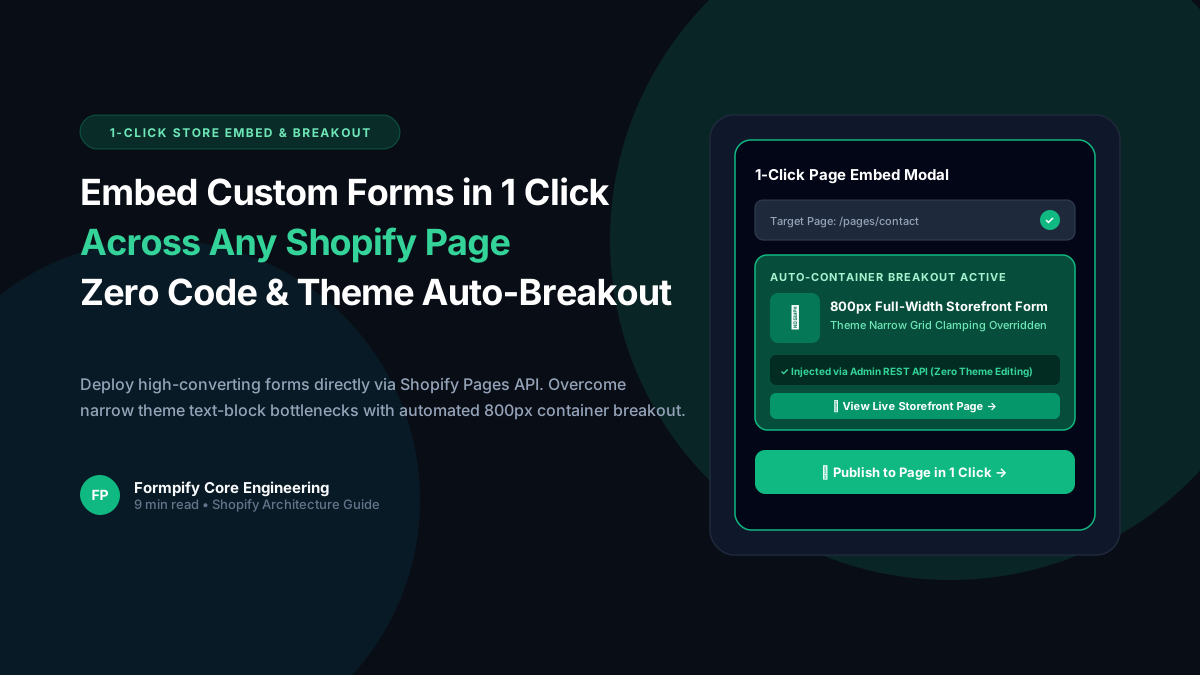
How to Embed Custom Forms on Any Shopify Page in 1 Click (Zero Liquid Code, Theme Auto-Breakout & Full-Width 800px Support)
Past Shopify form apps force merchants to manually copy liquid snippets, edit theme files, or suffer from cramped 360px mobile widths on desktop screens. Discover how Formpify v2.3.1 introduces seamless 1-click Store Page auto-embedding via Shopify Admin REST API and intelligent Theme Container Breakout for perfect 800px full-width forms.
 Tutorials
How to Build Advanced Dynamic Pricing Calculators on Shopify with Safe AST Math Formulas & Conditional Logic
Selling dimension-based items like custom glass, canvas prints, blinds, flooring, or bespoke upholstery? Standard Shopify variant pricing cannot calculate length × width formulas or conditional volume discounts. Discover how Formpify's Safe AST Math Formula Engine evaluates complex algebraic equations in real time without eval() vulnerabilities, keeping Canvas and Storefront in 100% sync.
 Tutorials
How to Build an Interactive Product Recommendation & Skincare/Size Quiz in Shopify (Without Bloated $50/mo Quiz Apps)
Traditional Shopify quiz apps charge $50–$300/month while injecting heavy scripts that devastate storefront performance. Learn how Formpify native Quiz Engine enables merchants to build custom recommendation quizzes with zero speed penalty, smart conditional branching, and instant 1-click AJAX cart bundling.
Ready to supercharge your Shopify forms?
Join thousands of merchants creating custom forms, surveys, and live cost calculators.